Configuration
Dependency resolution only makes sense in your environment: which profile you use, which USE flags you set, which packages are already on disk, and which extra trees you layered on top of Gentoo. portage-ng is designed so you do not pay a “migration tax” to express any of that. It reads the same files and databases as traditional Portage.
Configuration, in this chapter’s sense, is the act of telling portage-ng where your machine keeps that truth (paths, repositories, profile strategy) and which Gentoo-side files to honour—so the prover plans against the world you actually run, not a generic default.
This chapter starts with the central configuration file (config.pl), then shows how to register repositories and sync them into the knowledge base, and finally covers the /etc/portage/ files that control policy (USE flags, masks, keywords).
The configuration file
The central configuration file is Source/config.pl. It is a plain Prolog source file — every setting is a Prolog fact or rule that you can read, query, or override. The file is organised into logical sections; the most important ones for getting started are summarised below.
General
| Setting | Default | Purpose |
|---|---|---|
config:name/1 |
'portage-ng-dev' |
Program name shown in banners and logs. |
config:hostname/1 |
(auto-detected) | Current hostname, used to select per-machine configuration. |
config:installation_dir/1 |
(from Prolog flag) | Root of the portage-ng source tree. The knowledge base, certificates, and config files are resolved relative to this path. |
config:number_of_cpus/1 |
(auto-detected) | Parallelism level for parsing, proving, and building. |
config:verbosity/1 |
debug |
Verbosity level for runtime messages. |
Repository and metadata
| Setting | Default | Purpose |
|---|---|---|
config:trust_metadata/1 |
true |
When true, trust the repository-shipped md5-cache. When false, regenerate cache entries locally for every ebuild — expensive, but useful for overlay development. |
config:write_metadata/1 |
true |
Write on-disk cache entries for locally changed or new ebuilds during sync. |
Gentoo profile
| Setting | Default | Purpose |
|---|---|---|
config:gentoo_profile/1 |
'default/linux/amd64/23.0/...' |
The Gentoo profile path relative to the Portage tree's profiles/ directory. This must match the profile symlink on your Gentoo system. |
Profile loading strategy
| Setting | Default | Purpose |
|---|---|---|
config:profile_loading/2 |
standalone → cached |
Controls whether profile data is parsed from the Portage tree on every startup (live) or loaded from a pre-serialized cache (cached). Set per mode: standalone, daemon, worker, client, server. |
config:preference_cache/2 |
standalone → cached |
Controls whether preference:init/0 reloads materialized state from Knowledge/preference.qlf when the stamp matches, or rebuilds from profile + /etc/portage on every startup. |
See Profile loading strategy for details on generating and using the profile cache. See Preference cache for the materialized preference cache.
Paths
| Setting | Purpose |
|---|---|
config:portage_confdir/1 |
Path to the /etc/portage directory (or a development copy). Determines where make.conf, package.use, package.mask, etc. are read from. Comment out to use built-in fallback defaults. |
config:pkg_directory/1 |
Path to the VDB directory (/var/db/pkg on a standard Gentoo system). Defined per host in Source/Config/<host>.local.pl. |
config:world_file/1 |
Path to the world set file (auto-resolved from hostname). |
config:set_dir/1 |
Directory of named set files (one atom list per file). |
config:glsa_dir/1 |
Optional override for $PORTDIR/metadata/glsa (GLSA XML). |
config:glsa_injected_file/1 |
Applied-GLSA id file (Portage glsa_injected equivalent). |
config:preserved_libs_registry/1 |
Path to Portage’s preserved_libs_registry JSON used by @preserved-rebuild. Default maps …/db/pkg → …/lib/portage/preserved_libs_registry. |
config:preserved_libs_registry_override/1 |
Host-specific override for the preserve-libs registry path (multifile / dynamic). |
config:graph_directory/1 |
Output directory for generated dependency graphs and .merge files. Defined per host in Source/Config/<host>.local.pl. |
config:build_root/1 |
Root directory for build work (equivalent to Portage's PORTAGE_TMPDIR). |
config:build_log_dir/1 |
Directory for per-package build logs. |
Machine selection
| Setting | Purpose |
|---|---|
config:systemconfig/1 |
Resolves the machine-specific configuration file. Looks for Source/Config/<hostname>.local.pl; falls back to Source/Config/default.pl if not found. |
The machine config file is where repositories are created and registered — covered in the next section.
Proving
| Setting | Default | Purpose |
|---|---|---|
config:time_limit/1 |
300 (seconds) |
Maximum time for a single proof/plan computation before aborting. |
config:proving_target/1 |
run |
Proof depth: install for compile-time dependencies only, run to include runtime dependencies. |
config:reprove_max_retries/1 |
20 |
Maximum iterative learn-and-restart retries when the prover encounters conflicts. |
config:avoid_reinstall/1 |
false |
When true, verify already-installed packages instead of re-merging them. |
Building
| Setting | Default | Purpose |
|---|---|---|
config:build_transient_retry/1 |
true |
Retry a phase once when it fails with bash's PID-reuse race (wait: pid N is not a child of this shell). |
config:build_serial_retry/1 |
true |
Retry a failed compile/test/install phase once with MAKEOPTS=-j1 to rule out parallel-make races. |
config:deconflict_collisions/1 |
override |
Merge-time file collision handling when a blocker atom is missing from metadata: off (fail as usual), report (fail, but surface the collision as a deconfliction assumption), or override (re-merge with collision protection disabled so the merge succeeds). |
config:ghc_abi_repair/1 |
true |
Repair GHC ABI-hash breakage in-transaction: rebuild the packages listed by haskell-cabal's broken-package check, then re-run the failed phase (native haskell-updater). |
config:ocaml_abi_repair/1 |
true |
Repair OCaml/findlib ABI breakage in-transaction: map stale compiled-unit errors to their installed owners via the VDB, rebuild them, then re-run the failed phase. |
config:subslot_rebuild/1 |
true |
Plan same-version rebuilds of installed reverse dependencies when a sub-slot (:=) provider’s ABI changes inside a transaction. Complementary to the @preserved-rebuild set (FEATURES=preserve-libs consumers); this pass is automatic during prove/plan. |
config:toolchain_reactivation/1 |
true |
Re-activate the toolchain right after a toolchain package merges, before dependent builds continue. |
See Chapter 16: Building and Execution for how the retry chain and the domain exception fixups work.
Output
| Setting | Default | Purpose |
|---|---|---|
config:default_printing_style/1 |
'fancy' |
Plan output style: short, column, or fancy (tree-structured with Unicode box drawing and Powerline bubbles; see Chapter 14 for the MesloLGS NF font on Terminal.app). |
config:color_output/0 |
asserted | ANSI colour in terminal output. Retract to disable. |
config:color_palette/1 |
full |
Use flag colouring: easy (classic Portage red/blue) or full (reason-based, showing where each flag came from). |
Network
| Setting | Default | Purpose |
|---|---|---|
config:server_host/1 |
'mac-pro.local' |
Server hostname pin for client/worker mode (Bonjour must match). |
config:server_bind/1 |
localhost |
Interface the Pengine server binds (localhost or *). |
config:server_port/1 |
4000 |
HTTPS port for the Pengine server. |
config:bonjour_service/1 |
'_portage-ng._tcp.' |
mDNS service name for automatic server/worker discovery. |
LLM integration (optional)
LLM integration is entirely optional. If you do not need --explain, --llm, or semantic search, the LLM modules can be removed from the load graph without affecting core functionality (resolving, ordering, building).
| Setting | Default | Purpose |
|---|---|---|
config:llm_default/1 |
claude |
Default LLM service for --explain and --llm. |
config:llm_model/2 |
(per service) | Model version for each LLM provider (ChatGPT, Claude, Gemini, Ollama, etc.). |
config:llm_use_tools/1 |
true |
Whether the LLM may execute Prolog code locally during a conversation. |
config:llm_server_calls/1 |
false |
Allow Pengines clients to call explainer:call_llm/3 on the server (uses server API keys). |
config:curl_allow_http/1 |
false |
Permit cleartext http distfile mirrors (ftp never allowed). |
config:file_integrity/1 |
prefer |
Knowledge sidecar policy: prefer, require, or off. |
Most settings have sensible defaults. For a typical Gentoo system, the main items to configure are config:gentoo_profile/1, config:portage_confdir/1, and the repository definitions in the machine config file.
Configuring repositories
Not every literal in a proof refers to the same backing store. portage-ng models several repository kinds so the resolver can combine “what exists upstream”, “what is already installed”, and “what I added locally” without conflating them:
| Name | Role |
|---|---|
portage |
The main Gentoo tree, backed by md5-cache — the canonical source of buildable versions. |
pkg |
Installed packages (the VDB under /var/db/pkg/). Ground truth for what is already on the machine. |
overlay |
Additional ebuild trees (user overlays, testing repos, local layers), each with their own cache and sync rules. |
Each repository is a named OO instance created with a directive like:
:- portage:newinstance(repository).The name before :newinstance is the name you choose for the repository — portage here, but it could be anything: :- myoverlay:newinstance(repository). would create a repository called myoverlay. Each instance is specialised with a location, cache path, remote URL, protocol, and type. This uses the same context-based OO machinery introduced in Chapter 1 (Source/Logic/context.pl): a repository is an object that responds to sync, find_metadata, find_vdb_entry, and so on, not a loose bag of paths.
Multiple repositories coexist in one proof. If you registered both portage and myoverlay, a dependency chain can span both: a portage:// literal may pull in a myoverlay:// literal when only the overlay carries a needed version. Installed packages participate too — a pkg:// literal satisfies a runtime dependency without planning a fresh merge. Keeping repositories separate avoids conflating “what is available upstream”, “what I added locally”, and “what is already installed”, while still allowing the prover to relate them during resolution.
Machine files in Source/Config/ decide which of these instances exist on your host; see Machine configuration.
Machine configuration
Each machine has a configuration file under Source/Config/ that creates and registers repository instances. portage-ng looks for Source/Config/<hostname>.local.pl first; if not found, it falls back to Source/Config/default.pl.
A machine config file creates one or more repositories using newinstance, initialises each with paths and a sync protocol, and registers it with the knowledge base.
The five arguments to init are:
- Local path — where the repository lives on disk.
- Cache path — the md5-cache directory inside the repository.
- Remote URL — the upstream to sync from.
- Protocol — how to sync:
git,rsync, orhttp(tarball download). - Type — the repository format:
eapifor standard Gentoo ebuild trees.
The examples below show the supported options.
Portage tree via git (the most common setup):
:- portage:newinstance(repository).
:- portage:init('/usr/portage',
                '/usr/portage/metadata/md5-cache',
                'https://github.com/gentoo-mirror/gentoo',
                'git', 'eapi').
:- kb:register(portage).
Portage tree via rsync:
:- portage:newinstance(repository).
:- portage:init('/usr/portage',
                '/usr/portage/metadata/md5-cache',
                'rsync://rsync.gentoo.org/gentoo-portage',
                'rsync', 'eapi').
:- kb:register(portage).
Portage tree via HTTP snapshot:
:- portage:newinstance(repository).
:- portage:init('/usr/portage',
                '/usr/portage/metadata/md5-cache',
                'http://distfiles.gentoo.org/releases/snapshots/current/portage-latest.tar.bz2',
                'http', 'eapi').
:- kb:register(portage).
User overlay (a second ebuild tree layered on top):
:- myoverlay:newinstance(repository).
:- myoverlay:init('/var/db/repos/myoverlay',
                  '/var/db/repos/myoverlay/metadata/md5-cache',
                  '/var/db/repos/myoverlay/',
                  'rsync', 'eapi').
:- kb:register(myoverlay).
Local distfiles directory:
:- distfiles:newinstance(repository).
:- distfiles:init('/usr/portage/distfiles',
                  '', '', 'local', 'distfiles').
:- kb:register(distfiles).
Multiple repositories can be registered in the same file. During proving, the resolver queries all registered repositories and distinguishes them by their portage://, pkg://, or overlay prefix.
Syncing the tree
portage-ng does not crawl ebuild directories on every pretend merge. At runtime it works from a compiled Prolog knowledge base built from the same md5-cache files Portage uses: precomputed metadata blobs (dependencies, slots, USE defaults, and so on) produced by sourcing each ebuild through bash and extracting its declared variables — a process traditionally driven by Gentoo’s egencache, which writes the results under the repository’s cache directory. Treat the Portage tree, for resolver purposes, as a directory of cache files plus ebuilds; the cache is what makes bulk queries feasible.
portage-ng --sync--sync is the umbrella operation that brings that picture up to date: it syncs registered repositories (via git, rsync, or snapshot download), regenerates on-disk metadata where configured, reloads md5-cache into dynamic Prolog facts (according to the structure defined in cache.pl), and persists the result to disk so subsequent runs start near-instantaneously.
portage-ng --regen--regen (alias --metadata) addresses a narrower problem: refresh the on-disk md5-cache without performing a network sync. portage-ng can generate the md5-cache entirely on its own — it does not need traditional Portage or egencache for this step. Each ebuild is sourced through bash and its metadata extracted in incremental, parallel passes (see repository:sync(metadata) and config:trust_metadata/1 in the source). Traditional Portage is only needed for the actual building of packages, since portage-ng’s current focus is on the reasoning and planning side. Note that --regen is not a substitute for loading facts into Prolog: after regenerating the cache, run --sync again so Knowledge/kb.qlf matches the updated on-disk cache.
You can also sync a single repository by name:
portage-ng --sync myoverlayThis syncs only the myoverlay repository (and saves the knowledge base afterwards). Useful when you have changed an overlay but the main Gentoo tree is still up to date.
Repositories
In portage-ng's architecture, all repositories are registered with a central knowledge base (knowledgebase.pl). The command-line interface talks to the knowledge base, which delegates sync operations to each registered repository. After syncing the repositories, the knowledge base also triggers a profile sync — this reads the Gentoo profile directory (the chain of make.defaults, package.mask, use.mask, etc. that define your system's baseline policy) and the /etc/portage/ user configuration files, loading them into preference facts that the prover consults during resolution.
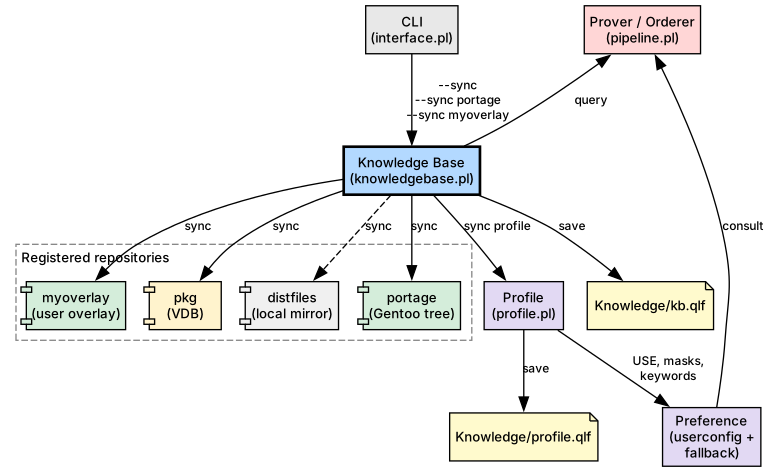
The result is two serialised cache files:
Knowledge/kb.qlf— all repository and cache facts (ebuilds, metadata, manifests).Knowledge/profile.qlf— all profile-derived data (USE terms, masks, per-package USE, license groups).Knowledge/glsa.qlf— Gentoo Linux Security Advisories parsed frommetadata/glsa/(see Chapter 20).Knowledge/preference.qlf— materialized preference state (built on first startup; see Preference cache).
See Profile loading strategy for details on live vs. cached profile loading.
Installed packages
To reason about what is already on the machine, portage-ng needs to know which packages have been installed. Portage records this in the VDB (Var DataBase), a directory tree at /var/db/pkg/ with one subdirectory per installed category/package-version. Each subdirectory contains metadata files that capture the state at install time: dependency declarations (DEPEND, RDEPEND, PDEPEND), the active USE flags, SLOT, KEYWORDS, compiler flags, a file manifest (CONTENTS), and bookkeeping fields like BUILD_TIME and SIZE.
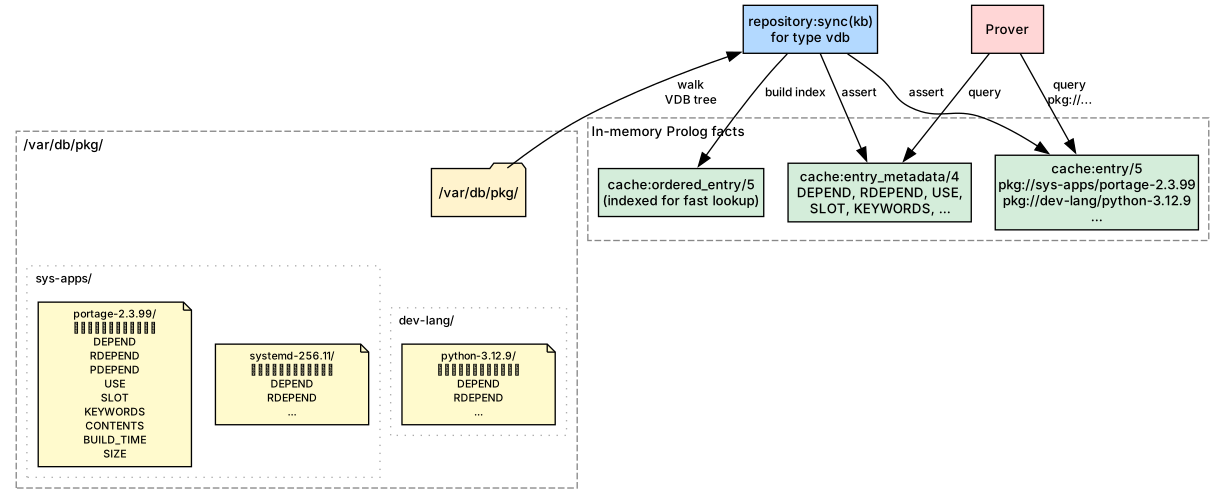
When --sync runs, the knowledge base syncs the pkg repository by walking the VDB tree and loading each installed package into the same in-memory fact structure used for available ebuilds. From that point on, the prover queries installed and available packages through the same interface — the only difference is the prefix: pkg:// for installed packages, portage:// for available ones.
This uniform representation means that during resolution, an already-installed package can satisfy a dependency directly without planning a fresh merge. In the plan output, these appear as [nomerge] — the prover verified the dependency is met by what is already on disk.
In client-server mode the server holds its own pkg repository, which may differ from the client's installed set. A client can upload its local VDB with --import-vdb; the server registers it as a per-client repository (pkg@<clienthost>) and uses it for that client's plans. With config:client_auto_import_vdb(true) (the default) this happens automatically before each client command whenever the local VDB changed. See Chapter 18 for details.
Gentoo configuration
Gentoo users already curate policy in /etc/portage/: USE overrides, masks, licences, and keywords. portage-ng reuses that investment — it reads Gentoo’s standard /etc/portage/ configuration files, making it a drop-in replacement for dependency resolution and plan computation from a policy perspective.
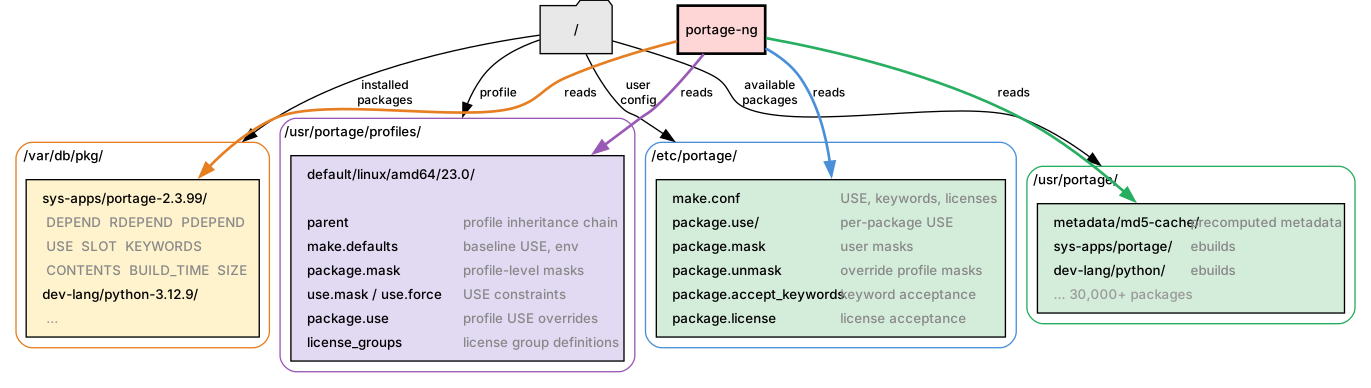
The diagram shows the four on-disk sources portage-ng consults: user configuration under /etc/portage/, the profile chain under the Portage tree's profiles/ directory, the installed-package database (VDB) under /var/db/pkg/, and the Portage tree itself with its ebuilds and md5-cache.
Supported files
portage-ng recognises the following standard Gentoo configuration files. Set config:portage_confdir/1 in Source/config.pl to point at your /etc/portage directory (or use the bundled templates under Source/Config/Gentoo/ during development).
| File | Purpose |
|---|---|
make.conf |
Global environment variables (USE flags, keywords, licenses, etc.). |
package.use |
Per-package USE flag overrides. |
package.mask |
User package masks. |
package.unmask |
Overrides profile-level masks. |
package.accept_keywords |
Per-package keyword acceptance. |
package.license |
Per-package license acceptance. |
All files are read from the directory set by config:portage_confdir/1 (typically /etc/portage/).
These files use standard Gentoo syntax, so existing /etc/portage/ directories work without modification.
File format
All files follow standard Gentoo syntax:
- Lines starting with
#are comments - Empty lines are ignored
- Inline
#comments are stripped
make.conf
Bash-style KEY="value" assignments. Parsed by the same engine that reads
profile make.defaults files (profile:make_defaults_kv/2).
USE="X alsa dbus -systemd"
ACCEPT_KEYWORDS="~amd64"
VIDEO_CARDS="intel"package.use / package.accept_keywords / package.license
One entry per line: a package atom followed by space-separated values.
# package.use
app-editors/vim        -X
>=sys-libs/gdbm-1.26   berkdb

# package.accept_keywords
=sys-apps/portage-3.0  ~amd64
dev-util/pkgdev        **

# package.license
app-text/calibre BSDpackage.mask / package.unmask
One package atom per line (simple cat/pkg or versioned like >=cat/pkg-1.0).
sys-apps/systemd
>=dev-lang/python-3.13Directory layout
All package.* files support both single-file and directory layouts, matching
Portage's convention:
/etc/portage/package.use           ← single file
/etc/portage/package.use/          ← directory
/etc/portage/package.use/custom    ← files read in sorted order
/etc/portage/package.use/gaming
When the path is a directory, all non-hidden files in it are read in sorted (lexicographic) order.
Template files
For development without a real Gentoo system, portage-ng ships template configuration files in Source/Config/Gentoo/:
Source/Config/Gentoo/
  ├── make.conf
  ├── package.use
  ├── package.mask
  ├── package.unmask
  ├── package.accept_keywords
  └── package.license
These contain commented examples that mirror a typical Gentoo setup. On a real Gentoo system, point config:portage_confdir/1 directly at /etc/portage instead.
Precedence
When the same setting appears in more than one place, portage-ng resolves it by checking sources from most specific to most general. The first match wins. For environment-like settings such as use flags, keywords, licenses, etc., the lookup order is:
- Command-line environment variables — values passed on the command line override everything else.
- make.conf — your
/etc/portage/make.confsettings come next. - Configuration templates — defaults provided by the portage-ng configuration templates (under
Source/Config/Gentoo/). These serve as a development baseline when no real/etc/portage/is configured. - Built-in defaults — hard-coded baseline values when nothing else is specified.
Package masks and per-package USE overrides follow a similar layering. Gentoo's profile tree is applied first (the chain of package.mask, package.use, use.mask, and use.force files that define baseline policy for your chosen profile). Your /etc/portage/ files are applied on top, so they can override profile-level decisions. Finally, fallback defaults fill in anything left unspecified.
In practice this means your /etc/portage/ customisations always take priority over profile defaults, and anything you pass on the command line takes priority over both.
Profile loading strategy
Profile data (USE flags, masks, per-package USE, license groups) can be loaded in two ways each time portage-ng starts:
- Live — the Gentoo profile tree is parsed from disk on every startup. This is the most accurate option because it always reflects the latest state of the profile, but it takes a moment longer to start.
- Cached — profile data is loaded from a pre-serialized cache file (
Knowledge/profile.qlf). This makes startup near-instantaneous, but the cache must be regenerated (via--sync) whenever the profile changes.
The strategy is set per operating mode in config.pl. portage-ng supports several modes of operation (standalone, daemon, worker, client, server — see Chapter 15: Command-Line Interface for details). Each mode can use a different loading strategy:
config:profile_loading(standalone, cached).
config:profile_loading(daemon,     cached).
config:profile_loading(worker,     cached).
config:profile_loading(client,     live).
config:profile_loading(server,     cached).
If the cached strategy is set but Knowledge/profile.qlf does not exist yet, portage-ng falls back to live loading automatically.
Generating the profile cache
The --sync command generates Knowledge/profile.qlf automatically:
portage-ng --syncAfter syncing all repositories, portage-ng walks the profile tree once and serializes all profile-derived data to disk. Subsequent runs that use the cached strategy load this file instead of re-parsing the profile tree.
What gets cached
The profile cache captures the following data so it does not need to be re-derived from the profile tree on each startup:
| Data | Source files |
|---|---|
| USE flag defaults | make.defaults along the profile chain |
| USE masks and forced flags | use.mask, use.force |
| Package masks | package.mask, package.unmask |
| Per-package USE overrides | package.use |
| Per-package USE masks and forced flags | package.use.mask, package.use.force |
| License groups | license_groups |
Preference cache
After profile and /etc/portage data are merged, preference:init/0 normally
materializes a large set of dynamic facts (global USE, package masks, per-package
USE overrides, license groups, world snapshots). That work can take a few seconds
when profile masks must be matched against the full portage cache.
To avoid repeating that on every startup, portage-ng can persist the materialized preference state to disk:
| File | Role |
|---|---|
Knowledge/preference.raw |
Textual serialization of preference facts (intermediate) |
Knowledge/preference.qlf |
QLF-compiled reload unit |
Knowledge/preference.stamp |
Fingerprint of inputs (file mtimes + env vars) |
The cache is regenerated automatically when the stamp no longer matches — for
example after --sync (which invalidates the cache when kb.qlf / profile.qlf
change), after editing /etc/portage, or when USE / ACCEPT_KEYWORDS /
ACCEPT_LICENSE change in the environment.
Control per mode in config.pl:
config:preference_cache(standalone, cached).
config:preference_cache(daemon,     cached).
config:preference_cache(worker,     cached).
config:preference_cache(client,     live).
config:preference_cache(server,     cached).
Client mode keeps live rebuilding because preference facts are injected from
the server in distributed proving.
World sets
portage-ng maintains world sets — the list of packages explicitly requested
by the user — under Source/Knowledge/Sets/world/. Each machine can have
its own .local world set file. The @world target resolves to all
packages in the active world set. The format is the same as Gentoo's
/var/lib/portage/world, so you can point portage-ng at your Gentoo
system's world file and use Portage and portage-ng side by side.
World set management is handled through the set.pl module, which supports
world(Atom):register and world(Atom):unregister proof literals to
add/remove packages during --merge operations.
After you change world membership or sync new tree data, rely on the same sync workflow described above: a standalone --sync refreshes Knowledge/kb.qlf and the profile cache (and invalidates the preference cache) so resolution sees an up-to-date union of tree, VDB, and world-related facts.
Further reading
- Chapter 2: Installation and Quick Start — prerequisites and first run
- Chapter 6: Knowledge Base and Cache — how the Portage tree is loaded into Prolog facts
- Chapter 15: Command-Line Interface — CLI options that interact with configuration
- Chapter 20: Gentoo Linux Security Advisories (GLSA) —
Knowledge/glsa.qlfbuilt during--sync