Semantic Search and LLM Integration
portage-ng integrates with large language models for three purposes:
semantic search over the knowledge base using vector embeddings,
plan explanation using natural-language generation, and
metacircular self-repair that proposes build-time learning from
failed build logs (human-confirmed feedback:* records, optional
fixup drafts).
Semantic search
The semantic search module (Source/Application/Llm/semantic.pl) enables
natural-language queries over the package knowledge base.
How it works
- Package descriptions are converted to vector embeddings via Ollama's
embedding API (default endpoint:
http://localhost:11434). - Embeddings are stored in an in-memory index.
- At query time, the search query is embedded and compared against all package embeddings using cosine similarity.
- Results are ranked by similarity score.
Usage
# Natural-language search
portage-ng --search "text editor with syntax highlighting"

# Find packages similar to a known package
portage-ng --similar app-editors/neovim
On Apple Silicon, Ollama leverages the GPU and Neural Engine for accelerated embedding computation.
Prerequisites
Semantic search requires:
- A running Ollama instance
- A loaded embedding model (configured via
config:semantic_model/1)
LLM-assisted plan explanation
The --explain / --llm flags send proof artifacts to an LLM for
human-readable interpretation of build plans and assumptions.
Provider backends
portage-ng supports multiple LLM providers, each implemented as a separate
module in Source/Application/Llm/:
| Module | Provider | Notes |
|---|---|---|
ollama.pl |
Ollama | Local inference; also provides embeddings |
claude.pl |
Anthropic Claude | Requires API key |
chatgpt.pl |
OpenAI ChatGPT | Requires API key |
gemini.pl |
Google Gemini | Requires API key |
grok.pl |
xAI Grok | Requires API key |
The default provider is set via config:llm_default/1. API keys and
endpoints are configured in Source/config.pl or via
Source/Config/Private/ template files.
Calling LLMs
portage-ng offers three ways to interact with an LLM.
Interactive chat (--llm)
The --llm flag opens an interactive chat session with the default
(or a named) LLM service. The session maintains conversation history,
so follow-up questions have context:
# Chat with the default LLM (configured in config.pl)
portage-ng --llm

# Chat with a specific service
portage-ng --llm claude
portage-ng --llm ollama
Inside the session, the LLM streams its response word by word to the
terminal. Type quit or exit to leave.
Plan explanation (--explain)
The --explain flag resolves a target first, then feeds the full
build plan to the LLM as structured context. The user can then ask
questions about the plan in a conversational loop:
# Explain a build plan interactively
portage-ng --pretend --explain dev-libs/openssl

# Single-shot question
portage-ng --pretend --explain "Why is zlib in the plan?" dev-libs/openssl
The plan context includes targets, every package with its action type and USE flags, dependency chains traced back to the root, and any assumptions the prover made. The LLM sees the full picture and can answer questions like "why is this package included?", "what would happen if I disabled this USE flag?", or "which assumptions were made?"
Programmatic access
From the Prolog shell, any LLM can be called directly:
% Call a specific service
claude("Explain what dev-libs/openssl does", Response).
ollama("What is a USE flag?", Response).
grok("Compare DEPEND and RDEPEND", Response).

% Or use the generic dispatcher
explainer:call_llm(claude, "Your question here", Response).
Each service maintains its own conversation history, so subsequent calls build on previous context.
Grounding: how the LLM learns portage-ng
Ordinary chat injects short config:llm_capability/2 primers (context,
architecture, chat, code). Those are not enough to invent APIs
safely, so the LLM is steered to a read-only knowledge pack:
| Predicate | Purpose |
|---|---|
llmknowledge:list_topics/0 |
Catalogue curated digests |
llmknowledge:print_topic/1 |
architecture, proof, assumptions, learning, code_map, … |
llmknowledge:print_handbook/1 |
Bounded Handbook chapter (prover, rules, building, …) |
llmknowledge:print_source/3 |
Whitelisted Source/… or Handbook excerpt by line range |
Call these from <call:swi_prolog> (sandboxed). Paths outside the
whitelist and .. traversal are rejected. Caps:
config:llm_knowledge_max_bytes/1,
config:llm_knowledge_max_source_lines/1.
Metacircular --diagnose additionally injects the learning and
code_map digests into its prompt. A future step can embed Handbook
- source for vector retrieval; the knowledge pack is the always-on path that does not require Ollama.
Module: Source/Application/Llm/knowledge.pl.
Code execution in the sandbox
One of portage-ng's most distinctive LLM features is that an LLM can execute Prolog code inside the running system and receive the output. This turns the LLM from a passive question-answerer into an active investigator that can query the knowledge base, inspect proof artifacts, and verify its own answers.
How it works
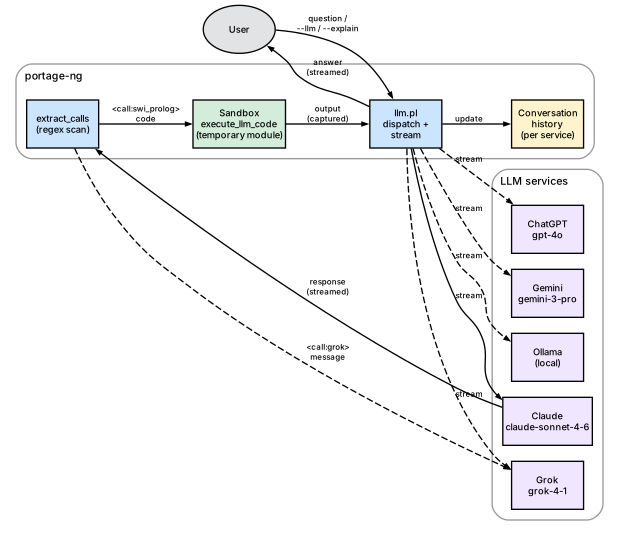
When an LLM responds, portage-ng scans the response for XML-style call tags. Two kinds are recognized:
<call:swi_prolog>...</call:swi_prolog>— the enclosed Prolog code is executed in a temporary, sandboxed module. The output (both standard output and error) is captured and sent back to the LLM as a function response.<call:claude>/<call:grok>/ etc. — the enclosed message is forwarded to another LLM service, and that service's response is sent back. This allows LLMs to consult each other.
The LLM is informed of these capabilities through a system prompt
assembled from config:llm_capability/2 clauses. The prompt
explains the available tags and how to use them, without the user
needing to know about the mechanism.
Sandbox safety
Code execution is sandboxed by default (config:llm_sandboxed_execution(true)).
The code runs in a temporary module created by SWI-Prolog's
in_temporary_module/3, with sandboxed(true) ensuring that only
safe predicates are accessible. The module is destroyed after
execution. This means the LLM can:
- Query the knowledge base (
cache:ordered_entry/5,query:search/2) - Inspect proof artifacts if they are in scope
- Perform computations and formatting
- Write output that gets captured and returned
But it cannot modify the file system, execute shell commands, or alter the running system's state.
Example interaction
The diagram below traces a single round trip. The user asks a
question; portage-ng forwards it (with a system prompt listing the
available capabilities) to the LLM. The LLM responds with embedded
Prolog code wrapped in a <call:swi_prolog> tag. portage-ng
detects the tag, executes the code in a sandboxed temporary module,
captures the output, and sends it back to the LLM as a function
result. The LLM then incorporates the verified fact into its final
answer, which is streamed back to the user.
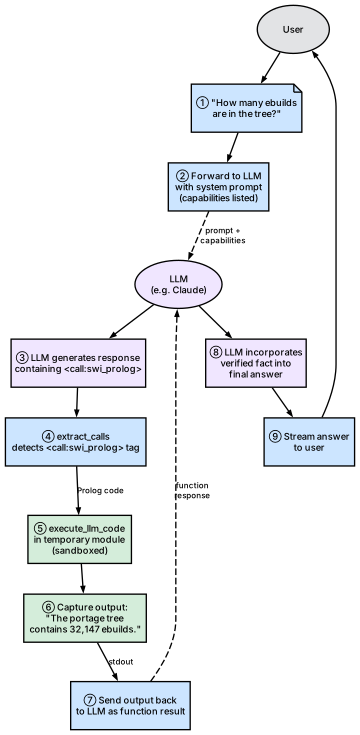
Concretely, a user asks "How many ebuilds are in the tree?" The LLM responds with:
<call:swi_prolog>
:- aggregate_all(count, cache:ordered_entry(portage, _, _, _, _), N),
   format('The portage tree contains ~w ebuilds.~n', [N]).
</call:swi_prolog>
portage-ng executes this code, captures the output ("The portage tree contains 32,147 ebuilds."), and sends it back to the LLM. The LLM then incorporates this verified fact into its final answer to the user.
Inter-LLM communication
The same tag mechanism allows LLMs to delegate questions to each
other. The diagram below shows the flow: the primary LLM (Claude
in this example) embeds a <call:ollama> tag in its response.
portage-ng detects the tag, forwards the enclosed message to Ollama,
collects Ollama's response, and sends it back to Claude as a
function result. Claude then weaves both perspectives into its
final answer.
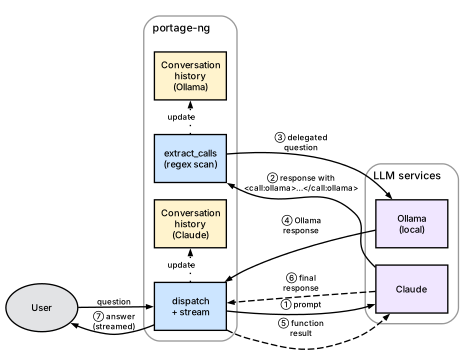
For example, a Claude session might embed
<call:ollama>Summarize this dependency chain</call:ollama> to get
a local model's perspective, or <call:grok>What is the latest version of openssl?</call:grok> to cross-check information. Each
delegated call maintains the target service's own conversation
history.
Suggestions and explanations
Beyond answering questions, the LLM integration supports two practical workflows: plan explanation and failure diagnosis.
Plan explanation
When --explain is active, portage-ng assembles a structured context
from the proof artifacts that includes:
- Targets — the packages the user requested
- Plan entries — every package in the merge plan with its step number, action type (install/run/download), USE flags (with annotations for user-set, profile-forced, and resolver-changed flags), slot information, and dependency chain
- Reverse dependency paths — for each package, the chain of dependencies tracing back to the root target ("zlib is needed by openssl, which is needed by python, which is the target")
- Assumptions — any domain assumptions or cycle breaks, with classified reasons (missing package, masked, keyword-filtered, slot mismatch, version conflict)
This context allows the LLM to give precise, grounded answers rather than generic advice. When a user asks "why is zlib in the plan?", the LLM can point to the exact dependency chain rather than guessing.
Failure diagnosis
When the resolver cannot satisfy a dependency, it records an
assumption_reason in the proof context. The explainer's
assumption_reason_for_grouped_dep/6 predicate diagnoses the failure
by progressively filtering candidates through existence checks, mask
checks, slot restrictions, version constraints, and keyword
acceptance. The classified reason (e.g. missing, masked,
keyword_filtered, version_conflict) is attached to the
assumption and included in the LLM context.
When the --llm flag is combined with a failing target, portage-ng
sends a specialized diagnostic prompt (config:llm_support/1) to the
LLM, providing the failure details and asking for help identifying the
correct package atom or diagnosing the issue.
Metacircular self-repair
When a build phase fails and deterministic fixups
(fixup:phase_retry_hook/10) do not mint new feedback:* knowledge,
portage-ng can ask the configured LLM to diagnose the failure and
propose structured repair actions. The module is
Source/Application/Llm/metacircular.pl.
Loop
- Builder records failed
Repo://Entry+ log path (builder:last_failed/3). - If
should_replanwould not fire (no new deterministic discoveries), andconfig:llm_metacircular(true)with an interactive TTY (not--ci), metacircular assembles context: plan summary, polarity-tagged assumptions, fallback tier, feedback backlog, learnedcn_domain, and a bounded log tail. - The LLM receives
config:llm_capability(metacircular, …)(excluded from ordinary--llmchat prompts) and must reply with a single term:
repair_proposal([
  action(record_discovery, Repo://Entry, 'cat/pkg', bdepend, Evidence),
  action(record_usedep, Repo://Entry, 'cat/pkg', [use(enable(foo),none)], Evidence),
  action(record_excluded_version, Cat, Name, Ver, Evidence),
  action(record_kernel_config, Repo://Entry, ['CONFIG_FOO'], Evidence),
  action(draft_fixup, MechanismName, Synopsis, SketchBody)
]).- Actions are validated (in-tree providers only; at most
config:llm_metacircular_max_actions/1, default 3). Each accepted action is confirmed interactively; confirmed feedback writes go throughfeedback:record_*so the existing replan loop re-derives the plan. draft_fixupwrites a sketch underKnowledge/drafts/(gitignored); it is never auto-loaded. A human must review and commit underSource/Domain/Gentoo/Exceptions/.
Safety model
Mutations happen host-side after confirm, never via
<call:swi_prolog>.Sandbox may read
feedback:*,missing_provider:package_in_tree/1, and parse helpers; it cannot callfeedback:record_*.New package edges belong in
feedback:*, notprover:learn/3(version/USE domains only).Kill-switch:
config:llm_metacircular(false).Skip loading LLM modules entirely:
config:load_llm_modules(false). Builder and CLI then no-op diagnose paths (stubs + softexplainer:call_llm/3); no existence errors.explainer:call_llm/3on the server is opt-in. Defaultconfig:llm_server_calls(false)keeps it off the Pengines safelist so authenticated clients cannot burn server API keys or exfiltrate prompts. LLM features are then host-local: run--explain/--diagnose/--llmon standalone or client processes (ownSource/Config/Private/api_key.pl). To allow server-side LLM via RPC on a trusted cluster, set in a host config orSource/Config/Private/::- asserta(config:llm_server_calls(true)).The server must also load LLM modules (
config:load_llm_modules(true)) and hold valid keys in itsapi_key.pl.
CLI
# Offline diagnose of a failed package (uses default log path)
portage-ng --diagnose cat/pkg

# Explicit log
portage-ng --diagnose --log /var/tmp/portage-ng/logs/cat--pkg-1.2.3.log cat/pkg
During an interactive --build, diagnose runs automatically after a
failed pass with no new deterministic discoveries (same confirm gate).
Explainer architecture
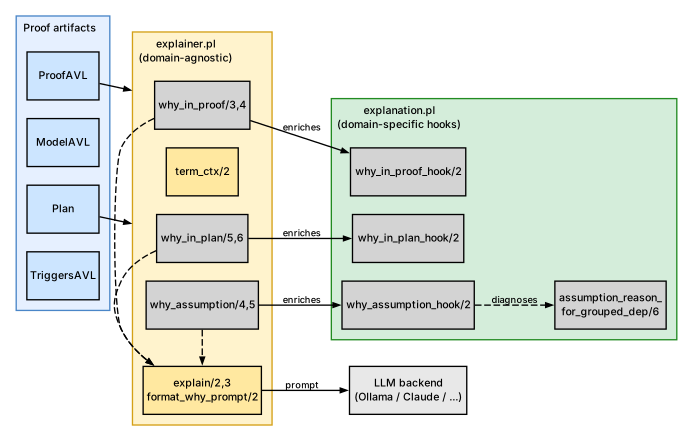
The explainer is split into two modules with clearly separated responsibilities.
Domain-agnostic introspection
explainer.pl answers "why" questions by inspecting the proof artifacts
(ProofAVL, ModelAVL, Plan, TriggersAVL) without knowing anything
about Gentoo or Portage. It provides three families of queries:
why_in_proof/3,4— given a literal, look it up in the ProofAVL and report how it was proved: via a normal rule, a domain assumption, or a prover cycle-break. Returns the body literals and the proof-term context.why_in_plan/5,6— given a literal and a plan, locate it in the wave schedule and trace a reverse-dependency path (via TriggersAVL) back to a root target. The result explains why this package is in the plan (e.g. "required by X, which is required by the target Y").why_assumption/4,5— given an assumption key, classify it (domain assumption, cycle-break, or model-only) and extract anyassumption_reasontags from the context.
The utility predicate term_ctx/2 extracts the ?{Ctx} context
list from any literal-shaped term. This is how the explainer accesses
the structured tags (USE state, slot info, suggestions, assumption
reasons) attached to each literal during the proof.
Domain-specific hooks
explanation.pl provides enrichment hooks that inject Gentoo-specific
context into the generic Why terms produced by explainer.pl. The
hooks are multifile predicates, so the domain layer plugs into the
generic layer without modifying it:
why_in_proof_hook/2— if the proof context contains domain reasons (masking info, keyword filtering, slot constraints), it appends adomain_reasons(Reasons)tag to the Why term.why_in_plan_hook/2— reserved for future plan-level Gentoo annotations (currently identity).why_assumption_hook/2— enriches assumption Why terms with domain reasons extracted from the assumption’s context.
The module also provides assumption_reason_for_grouped_dep/6,
which diagnoses why a grouped dependency resolution failed. It
inspects the candidate pool and classifies the failure (missing
package, all candidates masked, keyword-filtered, slot mismatch,
version conflict, etc.). This diagnosis is cached and feeds the
assumption_reason tags that appear in the proof context.
LLM dispatch
Both modules produce structured Prolog terms. When the user wants a
human-readable explanation, the explain/2,3 predicates in
explainer.pl convert the structured Why term into a text prompt via
format_why_prompt/2 (which uses term_to_atom/2 and prepends a
system preamble), then dispatch it to an LLM backend via
call_llm/3. The LLM backend is configurable
(config:llm_default/1) and can be Ollama, Claude, or any other
service that implements the expected interface.
A separate, richer LLM path exists in explain.pl
(Source/Application/Llm/explain.pl), which builds a multi-section
text context from the entire plan (targets, actions, USE flags,
assumptions) and sends it as a conversational prompt. This is used
by --explain and the interactive explain_plan_interactive/5 mode,
where the user can ask follow-up questions about the plan.
Query families
Three families of queries are supported:
- why_in_proof: given a literal, find how it was proven (normal rule, domain assumption, or prover cycle-break) and extract its body/deps.
- why_in_plan: given a literal and a plan, locate it in the wave-plan and trace a reverse-dependency path (via TriggersAVL) back to a root.
- why_assumption: given an assumption key, classify it (domain vs cycle-break vs model-only) and extract any reason tags.
Usage
All predicates are called with the explainer: module prefix.
Step 1: Obtain proof artifacts
Run the pipeline to get the proof, model, plan, and triggers:
Goals = [portage://'dev-libs/openssl-3.5.4':run?{[]}],
pipeline:prove_plan_with_fallback(Goals, ProofAVL, ModelAVL, Plan, TriggersAVL).
Or from a --shell session after loading a repository:
pipeline:prove_plan_with_fallback([portage://'dev-libs/openssl-3.5.4':run?{[]}],
Proof, Model, Plan, Triggers).Step 2: Ask "why" questions
Why is a package in the proof?
Target = portage://'dev-libs/libffi-3.5.2':install,
explainer:why_in_proof(ProofAVL, Target, Why).
% Why = why_in_proof(
%          portage://'dev-libs/libffi-3.5.2':install,
%          proof_key(rule(portage://'dev-libs/libffi-3.5.2':install)),
%          depcount(3),
%          body([portage://'sys-devel/gcc-15.2.0':install, ...]),
%          ctx([...]),
%          domain_reasons([...]))      % <-- added by explanation hook
Why is a package in the plan?
Proposal = [portage://'dev-libs/openssl-3.5.4':run?{[]}],
explainer:why_in_plan(Proposal, Plan, ProofAVL, TriggersAVL,
                      portage://'sys-libs/zlib-1.3.1-r1':install, Why).
% Why = why_in_plan(
%          portage://'sys-libs/zlib-1.3.1-r1':install,
%          location(step(1), portage://'sys-libs/zlib-1.3.1-r1':install?{...}),
%          required_by(path([portage://'sys-libs/zlib-1.3.1-r1':install,
%                           portage://'dev-libs/openssl-3.5.4':install,
%                           portage://'dev-libs/openssl-3.5.4':run])))
Why is something assumed?
Key = assumed(portage://'dev-foo/bar-1.0':install),
explainer:why_assumption(ModelAVL, ProofAVL, Key, Type, Why).
% Type = domain,
% Why  = why_assumption(
%          assumed(portage://'dev-foo/bar-1.0':install),
%          type(domain),
%          term(portage://'dev-foo/bar-1.0':install?{[assumption_reason(missing)]}),
%          reason(missing),
% domain_reasons([...])) % <-- added by explanation hookStep 3 (optional): Get a human-readable explanation via LLM
explainer:why_in_proof(ProofAVL, Target, Why),
explainer:explain(claude, Why, Response).
% Response = "openssl requires libffi as a build dependency because..."

% Or use the default LLM (from config:llm_default/1):
explainer:explain(Why, Response).
Available LLM services: claude, grok, chatgpt, gemini, ollama.
The default is set via config:llm_default/1. See config.pl for API keys,
models, and endpoints.
Assumption diagnosis
explanation:assumption_reason_for_grouped_dep/6 is called on the fallback
path when no candidate satisfies all constraints. It progressively filters
candidates through:
- Existence check →
missing - Self-hosting restriction →
installed_required - Mask check →
masked - Slot restriction →
slot_unsatisfied - Version constraints →
version_no_candidate(O,V)/version_conflict - ACCEPT_KEYWORDS →
keyword_filtered - Fallback →
unsatisfied_constraints
Example:
explanation:assumption_reason_for_grouped_dep(
  install,                                      % Action
  'dev-libs', 'missing-pkg',                    % Category, Name
  [package_dependency(install,no,'dev-libs','missing-pkg',
                      none,version_none,[],[])],
  [self(portage://'app-misc/foo-1.0')],         % Context
  Reason).
% Reason = missingHook mechanism
The explainer module calls explanation:why_*_hook(Why0, Why) after building
its generic Why term. If the hook succeeds, the enriched Why replaces the
generic one. Each hook extracts domain_reason(cn_domain(C, N, Tags)) tags
from the proof context and appends them as domain_reasons(Reasons).
The hooks are called automatically — no direct invocation needed.
Further reading
- Chapter 9: Assumptions and Constraint Learning — assumption taxonomy that the explainer queries
- Chapter 8: The Prover — proof artifacts consumed by the explainer
- Chapter 15: Command-Line Interface —
--search,--similar,--explainflags