Proof Literals
The universal literal format
Every term that flows through the portage-ng pipeline — from rules to prover to orderer to printer — uses the same universal format:
Repo://Entry:Action?{Context}Each component answers a question that arises at a different stage of the pipeline:
Repo— where does this fact come from? The rules consult different repositories (the Portage tree, the VDB, an overlay) and the repository prefix travels with the literal so the prover never confuses an available package with an installed one.Entry— what package version is meant? When the rules expand a dependency, they select a concrete cache entry ('category/name-version'). This identifier is the key the prover uses to look up and store proof work — two dependency paths that resolve to the same entry share the same proof node.Action— how should the pipeline treat this entry? The rules assign an action (:install,:run,:download,:update, ...) that tells the orderer which phase of work this literal represents and how to order it relative to others.Context— why and under what conditions was this literal introduced? As the prover expands the dependency graph, each literal accumulates a feature-term context: which parent introduced it (self), which USE flags are required (build_with_use), ordering markers (after), slot locks, and so on. At join points where two dependency paths reach the same literal, the prover merges their contexts via feature unification. The printer reads the final context to display USE flags, slot information, and assumption reasons.
Traditional resolvers scatter this information across separate side structures. portage-ng packs it into the literal itself, making every term self-describing: you can inspect a single literal and know its repository, version, phase, and full provenance without consulting external tables.
Operator precedences
The literal format is defined by three infix operators declared in
Source/Logic/context.pl. In SWI-Prolog, higher precedence means the
operator becomes the principal functor at that level of the term — i.e. it
sits higher in the parse tree. The ordering :// (603) > ? (602)
> : (601) was chosen so that the structure lines up with everyday use:
you scope by repository first, then attach the context list to the
ebuild core (Entry:Action), with entry and action paired at the
innermost level. That makes the common cases — “everything in portage”, or
“this category/name-version with this phase” — parse in the way you read
them. The ?{Context} annotation is intentionally the outer wrapper around the
core (after ://) because context is what changes most often during proof
search; the repository and entry/action spine stay stable while USE,
ordering, and constraint features are merged and refined.
| Operator | Precedence | Associativity | Parses as |
|---|---|---|---|
:// |
603 | xfx | Repo :// Rest |
? |
602 | xfx | Core ? {Context} |
: |
601 | xfx | Entry : Action |
Because :// has the highest precedence, a full literal parses as:
Repo :// ((Entry : Action) ? {Context})That is: repository scopes the whole term; the ebuild core is Entry : Action;
the context list attaches to that core.
Repo — the repository
The leftmost component identifies which registered repository the literal belongs to. It is an atom — the same atom used when registering the repository with the knowledge base:
:- portage:newinstance(repository).
:- kb:register(portage).
Common repository atoms:
| Atom | Meaning |
|---|---|
portage |
The main Gentoo Portage tree |
pkg |
The VDB (installed packages database) |
overlay |
A user or test overlay |
Literals from different repositories can coexist in the same proof. For
example, a portage://... literal might depend on a pkg://... literal when
an installed package satisfies a dependency.
Entry — the cache entry
The middle component is the cache entry identifier — a quoted atom in the
format 'category/name-version':
'sys-apps/portage-3.0.77-r3'
'dev-lang/python-3.13.2'
This atom maps directly to the second argument of cache:entry/5:
cache:entry(portage, 'sys-apps/portage-3.0.77-r3', 'sys-apps', 'portage',
            version([3,0,77],'',...)).
The category, name, and version are also available as separate fields in the cache, but the combined atom serves as the unique key for lookup.
Action — the phase
The component after the entry (inside the Entry : Action pair) specifies
what operation the literal represents. Actions fall into three categories:
Ebuild actions
These apply to Repo://Entry literals:
| Action | Meaning |
|---|---|
run |
Full installation + runtime availability |
install |
Build and install (DEPEND + BDEPEND + RDEPEND) |
download |
Fetch source archives |
fetchonly |
Legacy fetch-only ebuild action (overlay / cycle tests). CLI --fetchonly does not prove this; it proves :run and filters print/execute. |
reinstall |
Reinstall an already-installed package |
update |
Update to a newer version |
downgrade |
Downgrade to an older version |
upgrade |
Upgrade (used in VDB context) |
depclean |
Remove an unneeded package |
uninstall |
Uninstall a package |
Dependency and validation actions
Before the prover can expand a package's full dependency tree, it first needs
to answer two questions: which dependencies are actually active given the
package's USE flags, and is the USE configuration itself consistent? These
questions are answered in two dedicated phases — :config and :validate —
that run before the main :install / :run expansion.
The :config phase — computing the dependency model
When portage-ng resolves a package, it does not immediately try to prove every dependency listed in the ebuild's metadata. Instead, it first builds a dependency model: a stable snapshot of which dependencies are active under the current USE flag configuration.
An ebuild's metadata contains conditional dependencies guarded by USE flags.
For example, dev-lang/python might declare:
RDEPEND="ssl? ( dev-libs/openssl )
         readline? ( sys-libs/readline )
         !readline? ( sys-libs/libedit )"
The :config phase evaluates each dependency term against the effective USE
flags and retains only the active dependencies. In the example above,
if ssl is enabled and readline is disabled, the model will contain
dev-libs/openssl and sys-libs/libedit — the sys-libs/readline
dependency is dropped because its USE guard is not satisfied. Same-slot
self-references (a package listing itself as a build dependency in the
same slot) are treated as bootstrap dependencies and checked against the
VDB. Cross-slot self-references (same category and name but a different
slot) are resolved normally as regular dependencies.
When a choice group or constraint forces a decision, the prover may also
assume a flag — for instance, if an exactly_one_of group requires at
least one member to be enabled and none currently is, the prover picks the
most likely candidate and records a domain assumption so the user is informed.
The result is a model whose keys are the surviving dependency terms — the ones that actually need resolving.
For choice groups (OR dependencies), the :config phase picks one viable
alternative:
RDEPEND="|| ( dev-db/postgresql dev-db/mariadb dev-db/sqlite )"becomes a choice_group(Deps):config?{Context} literal. The rules try each
alternative, preferring already-installed packages, and commit to one choice.
The chosen dependency enters the model; the others are discarded. This means
that by the time the main proof begins, every OR group has been resolved to a
single concrete dependency.
This commit is always final (a cut after the first viable alternative).
Variant exploration does not remove that cut: it re-runs the prover
with thread-local branch-preference overrides
(variant:use_override, variant:branch_prefer) that reorder the
candidates, so the same cut selects a different branch on the re-proof —
see Multiple stable models.
| Action | Literal head | Meaning |
|---|---|---|
config |
grouped dependency | Resolve a dependency group under USE flags |
config |
package dependency | Check a single dependency |
config |
choice group | Pick one alternative from an OR group |
config |
USE conditional | Evaluate a USE-guarded block |
The :validate phase — checking REQUIRED_USE consistency
Ebuilds can declare constraints on which USE flag combinations are valid. For example:
REQUIRED_USE="^^ ( python_targets_python3_12 python_targets_python3_13 )"This says "exactly one Python target must be selected." The ^^ operator
translates to an exactly_one_of_group(...) term. Before expanding the
package's dependencies, portage-ng wraps each REQUIRED_USE constraint as a
:validate literal:
exactly_one_of_group([required(python_targets_python3_12),
                      required(python_targets_python3_13)]):validate?{[
  self(portage://'dev-lang/python-3.13.2')
]}
The rules check whether the effective USE flags for the package (identified by
the self(...) context tag) satisfy the constraint. For exactly_one_of, the
check counts how many of the listed flags are enabled and verifies the count
is exactly one. If the constraint is violated, the rules emit a domain
assumption recording the conflict:
assumed(conflict(required_use, exactly_one_of_group(Deps)))The full set of REQUIRED_USE operators:
| Operator | Group term | Constraint |
|---|---|---|
^^ |
exactly_one_of_group(Deps) |
Exactly one flag enabled |
| any-of | any_of_group(Deps) |
At least one flag enabled |
?? |
at_most_one_of_group(Deps) |
At most one flag enabled |
| (none) | use_conditional_group(...) |
Conditional: if A then B |
Each of these operators is wrapped as a :validate literal and checked
against the package's effective USE flags:
| Action | Literal head | Meaning |
|---|---|---|
validate |
exactly_one_of_group(...) |
Check ^^ constraint |
validate |
any_of_group(...) |
Check any-of constraint |
validate |
at_most_one_of_group(...) |
Check ?? constraint |
Non-ebuild literal heads
Some literals do not follow the Repo://Entry pattern:
| Literal | Meaning |
|---|---|
world(Atom):register |
Add a package to the @world set |
world(Atom):unregister |
Remove a package from the @world set |
target(Query, Arg):run |
Top-level target resolution (--merge, --fetchonly, --build) |
target(Query, Arg):fetchonly |
Legacy fetch-only target (not used by CLI --fetchonly) |
target(Query, Arg):uninstall |
Top-level uninstall target |
Context — the feature-term list
The context is a Prolog list wrapped in {} and attached via the ? operator.
It carries per-literal metadata that records provenance, ordering,
constraints, and USE requirements:
portage://'dev-lang/python-3.13.2':install?{[
  self(portage://'sys-apps/portage-3.0.77-r3'),
  build_with_use:use_state([ssl, threads], []),
  after(portage://'sys-apps/portage-3.0.77-r3':install)
]}
Reading this literal: "install dev-lang/python-3.13.2 from the portage
repository, because sys-apps/portage needs it (self), with USE flags ssl
and threads enabled (build_with_use), and schedule it after the
installation of sys-apps/portage (after)."
The context list is not an unstructured bag of annotations. It is the
proof-side counterpart of feature terms in the sense used by Zeller-style
feature logic (see Chapter 22: Context Terms): a
structured collection of features that can be merged when two dependency
paths describe the same package under different conditions. When two paths
reach the same literal with different USE requirements or other features, the
prover does not arbitrarily pick one path’s context — it combines them
using feature term unification (sampler:ctx_union/3), which relies on the same
feature machinery as the rest of the context subsystem. That is why context
lives in a dedicated suffix of the literal: it is the part that must stay
open to merge and refine as the proof graph grows.
self — who introduced this dependency
Every dependency in an ebuild comes from somewhere. The self(Repo://Entry)
tag records which package introduced this literal as a dependency. When the
rules expand a package’s dependency list, they stamp every child literal with
the parent’s identity:
portage://'dev-libs/openssl-3.4.1':install?{[
  self(portage://'dev-lang/python-3.13.2')
]}
This says "openssl is here because python depends on it." The self tag
serves three purposes:
Provenance tracking. The printer can show why a package appears in the plan — who pulled it in.
USE flag resolution. When checking whether a USE flag is enabled for a dependency, the rules look up the effective USE flags of the ebuild identified by
self. This is how the:validatephase works: theselftag tells the REQUIRED_USE checker which package’s USE configuration to consult.Self-dependency detection. When a package lists itself as a build dependency in the same slot (which happens for bootstrap packages), the rules recognise this by comparing the dependency target's category, name, and slot to the
selfentry. Same-slot self-deps are checked against installed packages; cross-slot self-deps (e.g.antlr-tool:4depending onantlr-tool:3.5) are treated as regular dependencies and resolved normally.
At most one self tag is present per context. When a literal is stamped, any
previous self is replaced — the immediate parent is what matters.
build_with_use — requirements imposed by parent
Gentoo dependency atoms can carry bracketed USE requirements: conditions
that must hold on the dependency target. For example, in sys-apps/portage’s
metadata:
RDEPEND="dev-lang/python[ssl,threads]"The brackets [ssl,threads] mean "I need python, and it must be built with
the ssl and threads USE flags enabled." The rules translate this into a
build_with_use context tag:
portage://'dev-lang/python-3.13.2':install?{[
  build_with_use:use_state([ssl, threads], [])
]}
The use_state(Enabled, Disabled) term lists which flags must be on and which
must be off. Negative requirements like [-test] appear in the disabled list:
build_with_use:use_state([], [test])When two dependency paths reach the same package with different USE
requirements, the prover merges them via feature unification. If portage
requires python[ssl] and another package requires python[xml], the merged
context becomes:
build_with_use:use_state([ssl, xml], [])If two paths disagree — one requires [debug] and another requires
[-debug] — the unification detects the conflict and the constraint system
handles it (potentially triggering a reprove with different candidate
selection).
The build_with_use tag is distinct from the package’s own USE flags. A
package’s USE flags are determined by profile, user configuration, and
defaults. The build_with_use tag captures what other packages demand of
this package. The printer reads both to display the final USE flag set,
marking flags that were pulled in by dependency requirements.
after — ordering markers
The ordering pass needs to know the order in which actions should be
scheduled. The after(Literal) tag expresses a hard ordering requirement:
"this literal must come after the specified literal in the final plan."
portage://'dev-lang/python-3.13.2':download?{[
  after(portage://'sys-apps/portage-3.0.77-r3':install)
]}
Ordering requirements arise naturally from the dependency structure. When
package A depends on package B, the rules add after(B:install) to A’s
download and dependency contexts. This ensures that B is installed before A
starts building.
The after tag propagates: when it is set on a literal, it is also
injected into that literal’s own children. If A must come after B, then A’s
dependencies also implicitly come after B. This transitive propagation ensures
that entire subtrees are correctly ordered.
For cases where ordering should not propagate, the after_only variant
exists. This is used primarily for PDEPEND (post-dependencies): a package’s
post-dependencies must come after the package itself, but the
post-dependency’s own children should not inherit that ordering requirement.
after_only(portage://'app-editors/neovim-0.12.0':run)The ordering bindings (Source/Domain/Gentoo/Rules/ordering.pl) read both after
and after_only from every literal’s context to derive the hard requirements
(requires/2) and the soft requirements — preferences (prefers/2) — that
drive the second proving pass (Chapter 13). Neither is a constraint in the
constraint-store sense (Chapters 8 and 9); the markers only steer ordering.
Summary of context tags
| Tag | Purpose |
|---|---|
self(Repo://Entry) |
The parent ebuild that introduced this dependency |
build_with_use:use_state(En, Dis) |
USE flags that must be enabled/disabled on this package |
after(Literal) |
Must come after this literal; propagates to children |
after_only(Literal) |
Must come after this literal; does not propagate |
slot(C, N, Ss):{Candidate} |
Slot lock from := sub-slot rebuild semantics |
replaces(pkg://Entry) |
Which installed package this action replaces |
assumption_reason(Reason) |
Why a domain assumption was made |
suggestion(Type, Detail) |
Actionable suggestion (keyword, unmask, use change) |
constraint(cn_domain(C,N):{D}) |
Inline version domain constraint |
onlydeps_target |
Marks a literal as an --onlydeps target |
world_atom(Atom) |
Planning marker for @world set membership |
Contexts are merged at join points via feature term unification, which uses Zeller-inspired feature unification. See Chapter 22: Context Terms for full details.
Canonical decomposition
The prover stores literals in assoc/AVL structures keyed by a stable
identity. That creates a design tension: during proof search, the context
is constantly enriched — new build_with_use features appear, ordering
constraints are propagated, slot locks and learned domains are attached — but
the underlying package and phase (repository, cache entry, action) are
still the same logical goal. If the full term including context were used as
the key, every refinement would look like a new node: you would get
duplicate entries for “the same” install step, incoherent merging, and broken
sharing of proof work.
Canonical decomposition fixes that by splitting each literal into a
core used for identity (R://L:A) and a context list carried as
associated data. Two encounters of the same core with different contexts
collide on the same key; the prover then merges contexts (via
feature term unification) instead of forking duplicate keys.
Two predicates handle decomposition:
prover:canon_literal/3
Strips the context from a literal, returning the core key and context separately:
canon_literal(R://(L:A),            R://L:A, {}).
canon_literal(R://(L:A?{Ctx}),      R://L:A, Ctx).
canon_literal(R://(L:A)?{Ctx},      R://L:A, Ctx).
canon_literal(R://(L:A?{C1})?{C2},  R://L:A, Merged).
The core R://L:A is used as the key in the Model AVL. The context is stored
as the value.
prover:canon_rule/3
Similarly decomposes a rule head, producing a context-free key for the Proof AVL.
This decomposition ensures that when a literal is re-encountered with a different context, the prover can find the existing proof entry and merge the contexts rather than creating a duplicate.
How literals flow through the pipeline
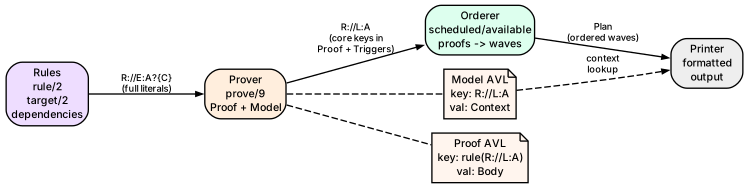
Rules produce literals. The
target/2rule resolves a user query to aRepo://Entry:run?{Context}literal. Dependency rules produce further literals with appropriate actions and contexts.Prover stores the core literal (
R://L:A) as the key in the Model AVL and the context as the value. The Proof AVL usesrule(R://L:A)as the key, with the rule body and context as the value.Orderer treats each rule head in the Proof AVL as a plan step and proves
scheduled/1for it through the planning laws; wave numbers are projected from the resulting availability proofs.Printer reads the Plan (a list of waves), looks up each literal in the Model AVL to recover its context, and formats the output.
Worked example
Tracing target('sys-apps/portage'):run?{[]} through the pipeline
(term shapes simplified: the real goal wraps a qualified_target/6
term parsed from the CLI argument, and the non-oneshot run-target rule
also adds a world(...):register condition):
1. User runs: portage-ng --pretend sys-apps/portage

2. Interface creates goal literal:
   [target('sys-apps'-'portage', []):run?{[]}]

3. Interface invokes the prover with this goal.

4. Prover uses rules to expand target/2:
   rule(target('sys-apps'-'portage', []):run?{[]},
        [portage://'sys-apps/portage-3.0.77-r3':run?{[]}])

5. Prover uses rules to expand :run:
   rule(portage://'sys-apps/portage-3.0.77-r3':run?{[]},
        [portage://'sys-apps/portage-3.0.77-r3':install?{[]},
         ...RDEPEND literals...])

6. Prover uses rules to expand :install:
   rule(portage://'sys-apps/portage-3.0.77-r3':install?{[]},
        [portage://'sys-apps/portage-3.0.77-r3':download?{[]},
         ...DEPEND/BDEPEND literals with self/1, build_with_use, after...])

7. Prover stores each proven literal in the Model AVL:
   Key: portage://'sys-apps/portage-3.0.77-r3':run
   Val: [] (context)

8. Orderer places :download in wave 1, :install in wave 2, :run in wave 3

9. Printer outputs:
   [1] portage://sys-apps/portage-3.0.77-r3  download
   [2] portage://sys-apps/portage-3.0.77-r3  install
[3] portage://sys-apps/portage-3.0.77-r3 runFurther reading
- Chapter 8: The Prover — how the prover uses these literals
- Chapter 11: Rules and Domain Logic — how rules produce literals
- Chapter 22: Context Terms — deep dive into context semantics and feature unification